October 16, 2026 · 4 min read
How I Run Qwen3.8-Flash-Next on My Ryzen AI Max+ 395 with Windows
The recipe I use to run Qwen3.8-Flash-Next locally on a 128 GB Strix Halo under Windows: why I dropped Strata, how I set it up on llama.cpp with Vulkan and MTP at 27 tokens per second, and how it compares to Qwen3.6-35B-A3B and Qwen3.8-27B.
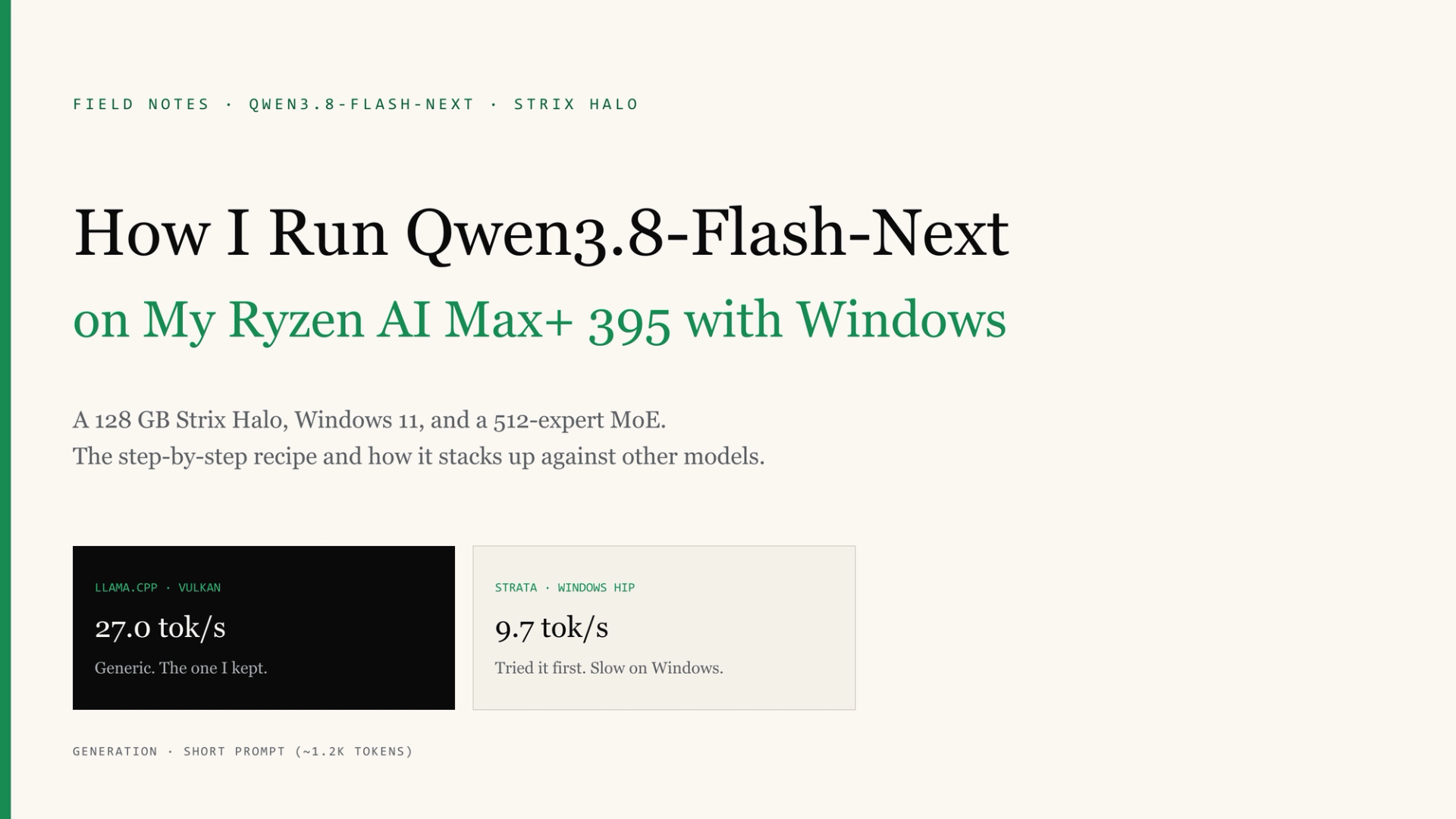
This is the recipe I use today to run Qwen3.8-Flash-Next locally, on Windows, with no Linux involved. I'll tell you what machine I have, what I tried first, what I ended up doing, and how it compares to the other models I use. If you have a similar setup, you should be able to replicate it step by step.
What machine I have
A Ryzen AI Max+ 395, what AMD calls Strix Halo, with the integrated Radeon 8060S (40 RDNA 3.5 CUs, gfx1151) and 128 GB of LPDDR5X-8000 unified memory. It runs Windows 11 Pro. The BIOS reserves 64 GB for the GPU and Windows sees the other 64. Check how much you're reserving for the GPU before you do any memory math.
What model I wanted to install and why
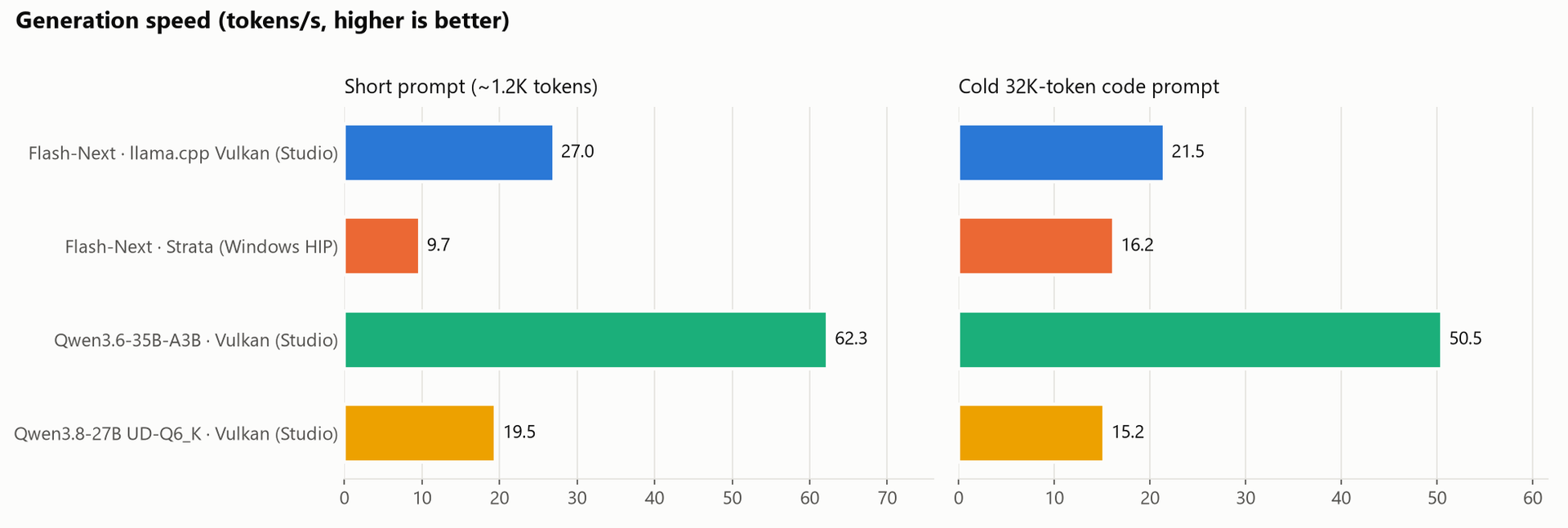
Until now I used two models: Qwen3.6-35B-A3B for everyday work, because it's very fast, and Qwen3.8-27B for the hard stuff, because it's smarter but slow (19.5 tokens per second).
Qwen3.8-Flash-Next is a large, sparse MoE: 48 layers of 512 experts, of which it uses 10 per token, about 6B active parameters. According to Qwen, it ties the 27B on SWE-bench Pro (62.5 vs. 61.7). My question was simple: does it give me 27B-level answers at a speed I can live with?
What I tried first: Strata
Strata is an MIT-licensed inference engine, built on ggml and designed specifically for this model family. It has a one-click installer, and Strix Halo support is experimental. Its docs say Windows on Strix Halo is untested, but I wanted to give it a shot.
Installation was easy:
START-HERE.bat --check
START-HERE.bat --yes --family unsloth --model UD-IQ4_XS --context 262144 --no-start
The first command detects the GPU and recommends a quantization (in my case, Unsloth's UD-IQ4_XS). The second downloads about 94 GB and leaves everything ready.
The result: it works, but it's slow. Between 9.7 and 11.7 tokens per second on short prompts. It does handle long prompts very well, though (496 tokens per second on a 32K prompt).
Why? It wasn't memory: 99% of the work ran on the GPU. The bottleneck is Strata's HIP path on Windows for this chip. On Linux, its maintainers report about 53 tokens per second with the same model, so the problem is Windows, not the hardware.
What I did: llama.cpp on Vulkan, via Unsloth Studio, with MTP
I already use Unsloth Studio, the desktop app that runs an OpenAI- and Anthropic-compatible server on 127.0.0.1:8888 on top of llama.cpp with Vulkan. Unsloth's llama.cpp build already supports this architecture and speculative decoding with MTP (a small head that guesses the next tokens). So I used the same GGUF files Strata had downloaded.
These are the steps:
1. Reuse the download. Studio reads the Hugging Face cache. Instead of pulling another 94 GB, I moved the three model files into models--unsloth--Qwen3.8-Flash-Next-GGUF/snapshots/<commit>/UD-IQ4_XS/ and wrote the commit hash to refs/main. First, I checked that each file's SHA-256 matched the one on Hugging Face. Studio listed the model right away and only downloaded the MTP head.
2. Save a profile for the model. In Studio, with "Remember for this model": 262K context, q8_0 KV cache, MTP with 2 drafts, a single slot, and low reasoning effort.
3. Fix the memory. This is where I tripped up. With -ub 2048 everything was fine in the speed tests, but halfway through the quality tests the server crashed with decode() failed: bad allocation. It wasn't VRAM. It was the Windows commit limit: 160 of 168 GB, while llama-server was only using 113. On Windows, GPU memory counts against that limit, and Studio was loading a 27 GB embedding table fully into RAM, even though the model barely touches it.
The fix is two changes:
--load-mode mmap --lazy-mode on: the 27 GB table stays on the SSD and is read on demand. It frees about 31 GB and speed doesn't change.-ub 1024instead of 2048: it cuts the compute buffers in half.
With that I ended up at 124 of 164 GB committed and about 31 GB of free RAM.
4. Set reasoning to low. This is mandatory. With the default settings, Flash-Next spent 12,000 tokens (10 minutes) thinking about a parser and never wrote the code. With --reasoning-effort low, the same task took it about 3,400 tokens.
5. The final configuration. This is my Studio profile, equivalent to these llama-server flags:
-c 262144 -np 1 -fa on -ub 1024 --cache-type-k q8_0 --cache-type-v q8_0
--model-draft mtp-Qwen3.8-Flash-Next-Q8_0.gguf
--spec-type draft-mtp --spec-draft-n-max 2
--ctx-checkpoints 4 --cache-ram 0
--reasoning on --reasoning-budget 16384 --reasoning-effort low
--load-mode mmap --lazy-mode on
Result: 27.0 tokens per second on short prompts and 21.5 on a 32K prompt. Almost triple what I got with Strata on short prompts.
How it compares to my other models
I measured them with the same prompts. For quality I used eight tests: six coding tasks graded by tests, a parallel tool call, and a JSON-schema extraction.
- Model (Windows 11, Vulkan): Qwen3.6-35B-A3B · Tokens/s, short prompt: 62.3 · Tokens/s, 32K prompt: 50.5 · Quality: 7/8
- Model (Windows 11, Vulkan): Qwen3.8-27B (UD-Q6_K) · Tokens/s, short prompt: 19.5 · Tokens/s, 32K prompt: 15.2 · Quality: 8/8
- Model (Windows 11, Vulkan): Qwen3.8-Flash-Next (UD-IQ4_XS) · Tokens/s, short prompt: 27.0 · Tokens/s, 32K prompt: 21.5 · Quality: 7/8
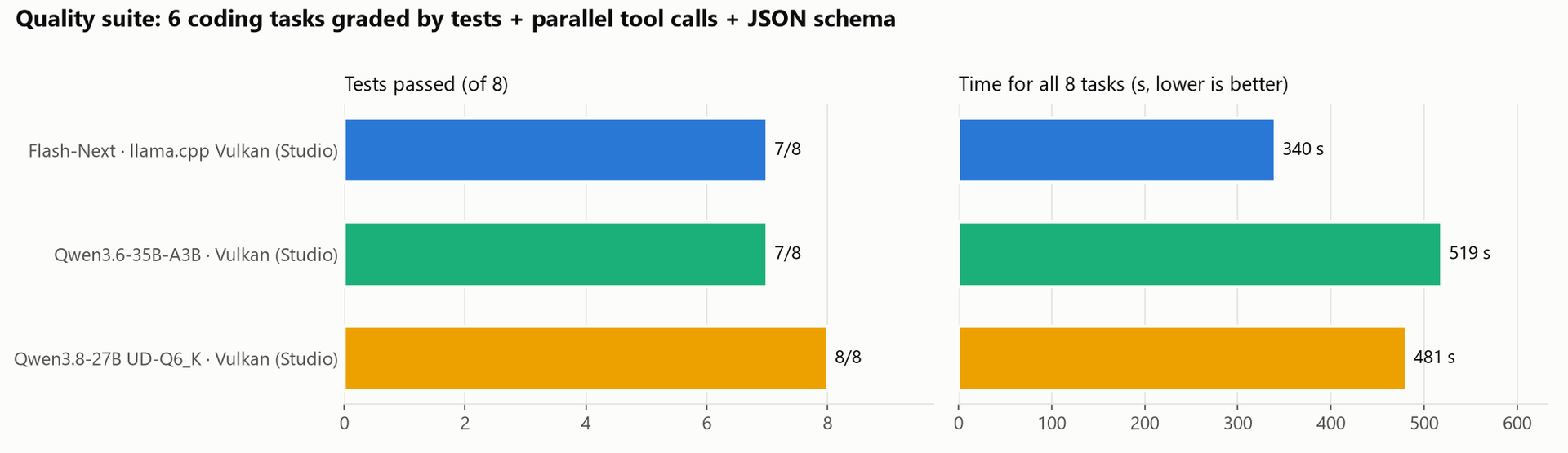
Eight tests are far too few to rank the three; each one failed a different task. What they do show is that they play in the same league, and that Flash-Next got through the suite fastest: in 30% less time than the 27B.
This is how I use them now:
- Qwen3.6-35B-A3B for everyday work. It's still, by far, the fastest.
- Qwen3.8-Flash-Next for the hard problems. It replaces the 27B: similar results in my tests, with 1.4 times faster generation and 1.5 times faster prompt processing.
- Only one model loaded at a time. Flash-Next takes about 62 GB of GPU memory plus about 14 GB of shared memory.
If you have this machine on Windows, the recipe is short: llama.cpp on Vulkan, MTP with 2 drafts, reasoning set to low, and the embedding table loaded lazily. On Linux they say you can go quite a bit faster, but that's for another post.
Comments(0)
Be the first to comment.
Keep reading